C2ME Watchdog Crash on Fabric: Find It and Fix It with a Mixin
When your modded Fabric server suddenly freezes and gets stopped by the watchdog (a built-in supervisor) after a minute, the cause is often hard to find. In this guide I’ll walk you through a real case. The performance mod C2ME loads chunks (pieces of the world map) on its own worker threads, which run in parallel. While that happens, the Fabric API (a base library for Fabric mods) touches a map, a kind of lookup table, that isn’t built for multiple threads. You’ll learn how to read the crash report and what to do right away. After that you fix the problem with a mixin, a small patch that changes another mod’s code at startup. My example is CobbleBox, my Cobblemon server on Minecraft 1.21.1 with Fabric and the COBBLEVERSE modpack. This exact crash happened there four times in one day.
Quick summary
- Your server suddenly freezes and crashes after a minute.
- It happens because two parts of the server software, the C2ME mod and the Fabric API, work on the same list at the same time and get in each other’s way.
- The fix is a small mod you build yourself that only runs on the server. Your players don’t have to install anything.
- Useful for anyone running a Fabric server with lots of mods.
- You need access to the crash report and server log, some basic Java knowledge and Docker or a JDK 21 to build the mod. For the mod project, either use the finished mod from my repo minecraft-weekly-world or your own project from the Fabric template.
Symptom: the server freezes and the watchdog kills it after 60 seconds
From the outside the crash always looks the same. Players keep moving for a moment, then everything stops. Chat, mobs and redstone stop responding. After 60 seconds Minecraft’s watchdog steps in, writes a crash report and shuts the server down. If your panel restarts the server automatically, everyone gets back in after a few minutes, until it happens again.
On CobbleBox the crash hit on October 5 at 12:20, 20:53 and 22:10, each time in the weekly adventure world. That’s a separate world created with the MultiWorld mod that gets a new seed (the starting value the landscape is generated from) every week. At 22:43 it hit the main world too, triggered by a Waystone teleport.
The watchdog itself is never the cause. It only reports that a server tick (a single calculation step of the server) took too long. So you need to find out what the server thread was waiting for.
How to read the crash report
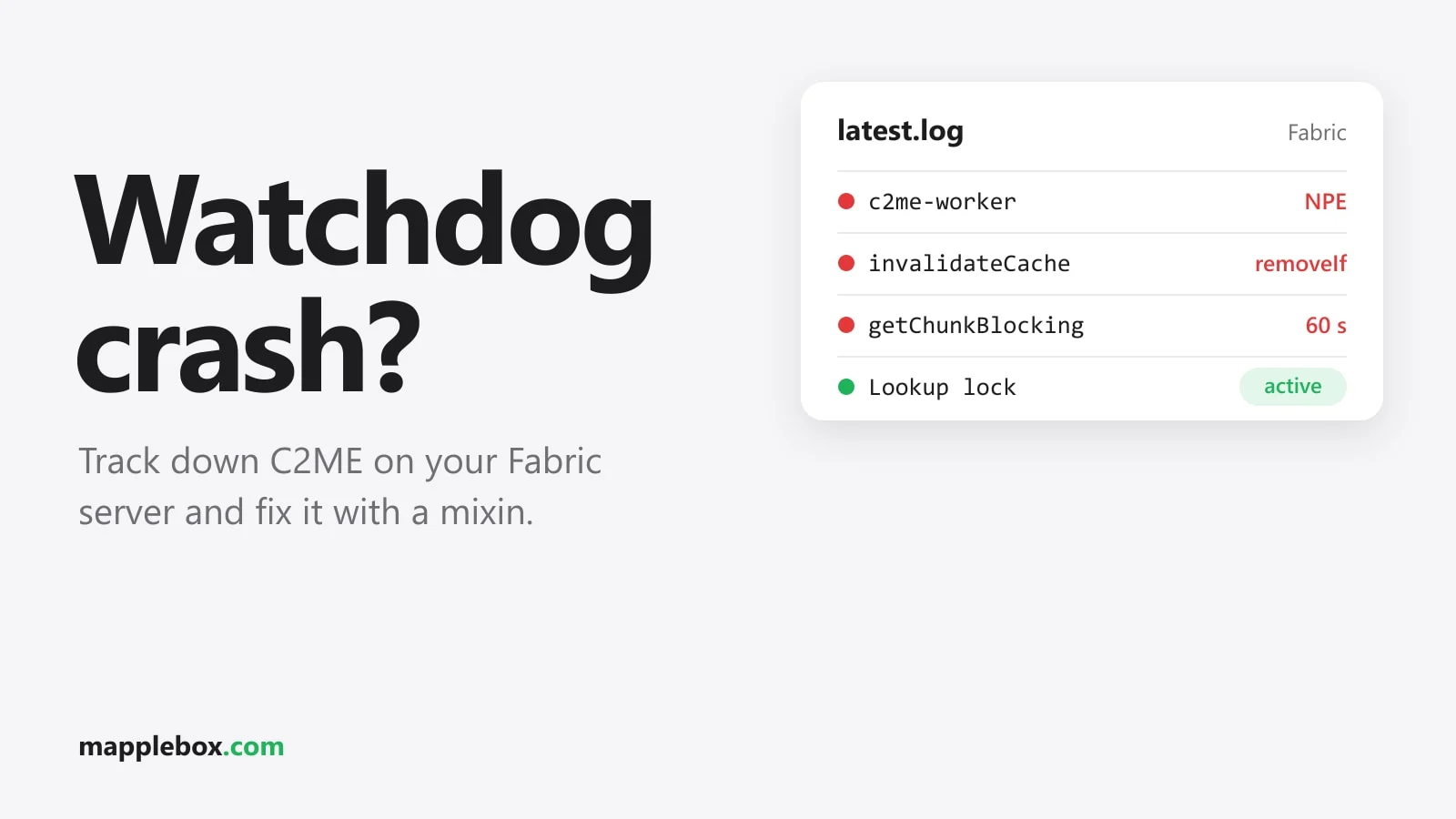
A watchdog crash report contains the stack traces of all threads, meaning for each thread the place in the code where it currently is. The server thread shows you where it’s stuck, and here that was getChunkBlocking. So it’s waiting for a chunk to finish loading. Next you look for the thread that was supposed to load that chunk. With C2ME these threads are called c2me-worker, and the log often shows the message Error upgrading chunk before the crash.
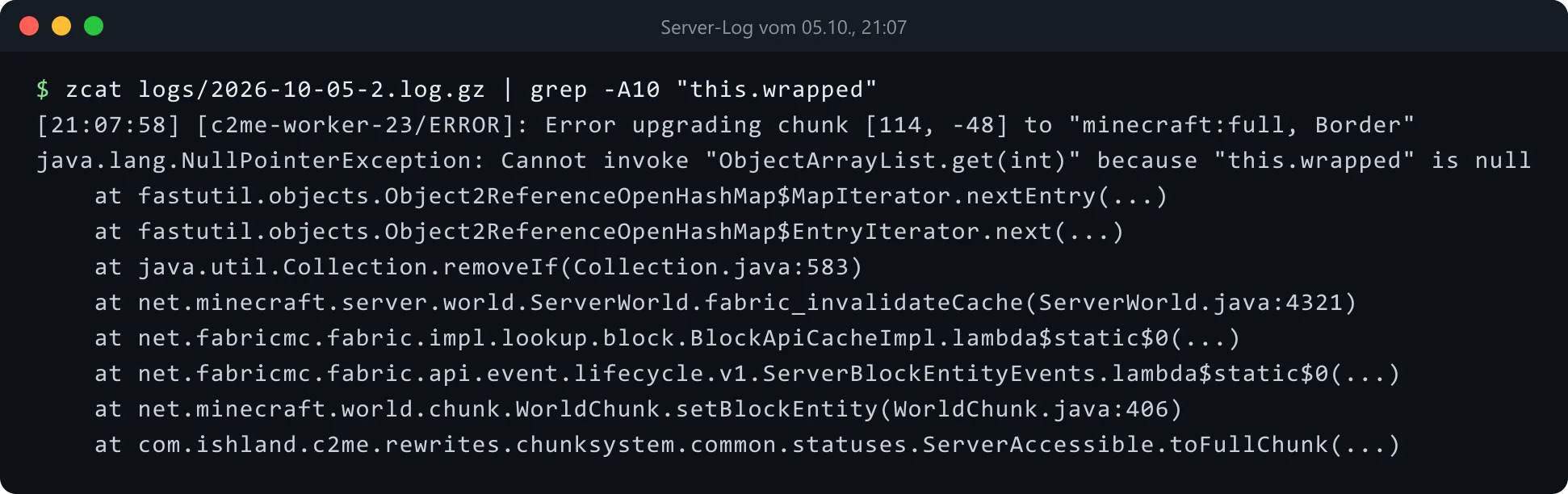
The excerpt shows the server thread waiting for a chunk while a C2ME thread aborts with an error. The lines are shortened and only show the spots you look for in the report:
Thread "Server thread"
  ... ServerChunkManager.getChunkBlocking   <- waiting for a chunk

Thread "c2me-worker-..."
  java.lang.NullPointerException: ... "this.wrapped" is null
  ... Object2ReferenceOpenHashMap ... removeIf
  ... ServerWorld.fabric_invalidateCache
  ... BlockApiCacheImpl
  ... (block entity is created while loading the chunk)
Put simply, two threads change the same table at the same time. Reading from bottom to top: C2ME loads a full chunk on a worker thread. A block entity (a block with its own data) gets loaded, and that fires an event in the Fabric API. The Fabric API keeps a cache per world for its block API lookups (BlockApiCacheImpl). It has to invalidate that cache for the position, meaning mark it as outdated. To do that it calls fabric_invalidateCache, a method Fabric adds to ServerWorld through its own mixin. That method cleans up an Object2ReferenceOpenHashMap with removeIf. This map from the fastutil library isn’t thread-safe, so it can’t handle simultaneous access. If another thread changes it at the same time, the loop through the map breaks. The result is an NPE (NullPointerException, an access to something that doesn’t exist) with "this.wrapped" is null.
So the chunk never finishes, the server thread waits for it in getChunkBlocking forever, and after 60 seconds the watchdog pulls the plug. The second thread working on the map at the same time is the server thread itself. It registers new caches in the same map through fabric_registerCache.
Why it crashes during play and not during pregen
Two observations helped with the search. First, the crash only happened in the MultiWorld world, which is created internally with the Fantasy library, and not in the main world. Second, pre-generating the world (pregen) with the Chunky mod never triggered the crash, even though Chunky worked through the adventure world at about 380 chunks per second. What triggered it were players moving through the world.
That fits a race condition, a bug that only shows up when two processes happen to collide. For the crash, two threads have to work on the same map at once: a C2ME worker invalidating while loading, and the server thread registering caches. During pregen without players, little happens on the server thread in that world. When players are out exploring, both sides run in parallel. The more chunks with block entities get loaded, the more often it hits. Why the MultiWorld world was affected more often at first couldn’t be fully explained. The crash in the main world that same evening showed that the problem isn’t tied to MultiWorld, though. It can hit any world where C2ME loads chunks.
First response: close the affected world
Before you start building a fix, make sure your players stop getting kicked. On CobbleBox the adventure world was closed at 22:45. Access through the NPC was blocked with a scoreboard flag. The automatic weekly rotation wasn’t allowed to reopen the world, and players were told in chat. If the problem happens in an extra world, closing it is the fastest way to keep your players away from it. The affected players later got a small in-game compensation.
Which fixes were on the table
Before writing any code, these were the options:
- Change a C2ME setting or hope for a C2ME update. That concerns a mod that ships with the modpack and isn’t under your control.
- Create the weekly worlds as regular datapack dimensions instead of using MultiWorld and Fantasy. That means separate worlds defined by a datapack (a file bundle for Minecraft). It would have been a big rebuild and wouldn’t have prevented the crash in the main world.
- A mixin that moves the invalidation onto the server thread.
- A mixin that puts both accesses to the map behind one lock per world. A lock only lets one thread through at a time.
The original plan was to reproduce the crash on an empty test server first. Because the error in the stack trace was so clear, I went with the last option. It changes the least: the Fabric API keeps doing exactly what it did before, the two threads just stop getting in each other’s way. And it could go into the server mod CobbleBox already had.
The mod project: finished mod or your own template
A mixin needs a mod to live in. On CobbleBox that was the existing server mod. You have two options.
Option 1 is the mod from my repo mapplebox/minecraft-weekly-world. It actually belongs to the weekly adventure world, but it contains exactly this lock mixin as ServerWorldLookupLockMixin. You control it in config/weeklyworld.json with "lookupCacheLock": true, which is the default. The mod’s world features stay unused as long as you don’t create dimensions with the prefix weekly_. The mod builds with the Gradle wrapper from the repo (./gradlew build). If the build fails for you, open an issue in the repo.
git clone https://github.com/mapplebox/minecraft-weekly-world.git
cd minecraft-weekly-world/mod
# build as described below in "Build the mod"
Option 2 is your own lean project. You generate it with the official template generator at fabricmc.net/develop/template. Enter the mod name, package name (for example de.example.servermod) and Minecraft version 1.21.1. By default, the generator creates a project with Mojang Mappings. According to the Fabric docs, you pick Yarn mappings instead under “Advanced Options”, because the code in this guide is written with Yarn names. The labels in the generator can change over time. After the download, check build.gradle to confirm it worked (see the next paragraph). If the generator offers an option to split client and common code, you can turn it off for a server-only mod. You get a zip with the Gradle wrapper, fabric.mod.json, a mixin config and example classes, and you drop the classes from this guide into it.
Mappings are the name tables that give Minecraft’s obfuscated code readable names. Yarn is Fabric’s community version, and Mojang Mappings are Mojang’s official names. At the time of writing, the official fabric-example-mod uses Mojang Mappings too. If you copy the code below into a project like that, the compiler won’t know classes like ServerWorld or World.OVERWORLD, because there they’re called ServerLevel and Level.OVERWORLD. You can see which mappings your project uses in build.gradle: mappings "net.fabricmc:yarn:..." means Yarn, mappings loom.officialMojangMappings() means Mojang.
A mixin with one lock per world
Every ServerWorld gets its own lock object. The two methods fabric_registerCache and fabric_invalidateCache are wrapped so only one thread at a time can get in. Simplified, the mixin looks like this, as the file src/main/java/de/example/servermod/mixin/ServerWorldLookupLockMixin.java (Yarn mappings):
package de.example.servermod.mixin;

import com.llamalad7.mixinextras.injector.wrapmethod.WrapMethod;
import com.llamalad7.mixinextras.injector.wrapoperation.Operation;
import de.example.servermod.LookupLocked;
import net.fabricmc.fabric.impl.lookup.block.BlockApiCacheImpl;
import net.minecraft.server.world.ServerWorld;
import net.minecraft.util.math.BlockPos;
import org.spongepowered.asm.mixin.Mixin;
import org.spongepowered.asm.mixin.Unique;

@Mixin(value = ServerWorld.class, priority = 1500)
public abstract class ServerWorldLookupLockMixin implements LookupLocked {
    @Unique
    private final Object example$lookupLock = new Object();

    @WrapMethod(method = "fabric_registerCache", remap = false, require = 0)
    private void example$lockRegister(BlockPos pos, BlockApiCacheImpl<?, ?> cache,
                                      Operation<Void> original) {
        synchronized (example$lookupLock) {
            original.call(pos, cache);
        }
    }

    @WrapMethod(method = "fabric_invalidateCache", remap = false, require = 0)
    private void example$lockInvalidate(BlockPos pos, Operation<Void> original) {
        synchronized (example$lookupLock) {
            original.call(pos);
        }
    }
}
A few details to watch for:
@WrapMethodcomes from MixinExtras and exists from MixinExtras 0.4.0 on. Fabric Loader ships that version from 0.16.0 on, so you don’t have to add MixinExtras yourself. That’s why you set"fabricloader": ">=0.16.0"infabric.mod.json. The imports arecom.llamalad7.mixinextras.injector.wrapmethod.WrapMethodandcom.llamalad7.mixinextras.injector.wrapoperation.Operation.@WrapMethodwraps the entire method, andoriginal.call(...)calls the original. That lets you put the whole call into asynchronizedblock.- Both methods don’t exist in vanilla code (unmodified Minecraft). The Fabric API adds them with its own mixin, which runs at the default priority of 1000. Your mixin therefore gets
priority = 1500so it’s applied afterwards, when the methods already exist. remap = falseis needed because the method names come from Fabric and not from the Minecraft mappings.require = 0keeps the server from failing to start if a later Fabric API version renames the methods. The fix is then silently inactive, though, which is why you need the log line further down.- The lock is per world. Different dimensions don’t block each other.
The interface LookupLocked is an empty marker, a label without code. The fix itself works without it, but it lets you check at startup whether the mixin was actually applied. The interface has to live outside the mixin package. You’ll see why further down. So create it as src/main/java/de/example/servermod/LookupLocked.java:
package de.example.servermod;

public interface LookupLocked {
}
The mixin config, a small JSON file (a text format for settings) under src/main/resources/, tells Fabric which mixin class to load. The template already creates it as <modid>.mixins.json. Enter your package and the name of the mixin class there:
{
  "required": false,
  "minVersion": "0.8",
  "package": "de.example.servermod.mixin",
  "compatibilityLevel": "JAVA_21",
  "mixins": ["ServerWorldLookupLockMixin"],
  "injectors": {"defaultRequire": 0}
}
fabric.mod.json ties everything together. "mixins" holds the file name of the mixin config, and "entrypoints" holds the class with the ModInitializer that writes the log line from the section after next at startup. "depends" requires Fabric Loader 0.16.0 or newer (because of @WrapMethod) and the Fabric API, whose methods the mixin wraps. With "environment": "server" the mod only runs on the server, and your players don’t need to install it. The template sets "*" here, so change that. Shortened, the file looks like this:
{
  "schemaVersion": 1,
  "id": "servermod",
  "version": "${version}",
  "name": "Server Mod",
  "environment": "server",
  "entrypoints": {
    "main": ["de.example.servermod.ServerMod"]
  },
  "mixins": ["servermod.mixins.json"],
  "depends": {
    "fabricloader": ">=0.16.0",
    "minecraft": "~1.21.1",
    "java": ">=21",
    "fabric-api": "*"
  }
}
Build the mod without installing Java locally
Minecraft 1.21.1 needs Java 21. Gradle is the build tool that turns the source code into the finished mod file. A project from the template comes with the Gradle wrapper ./gradlew, which downloads the right Gradle version by itself. If you have a JDK 21 (the Java development kit) installed locally, ./gradlew build in the project folder is all you need. Without local Java, you build in a Docker container (an isolated environment with Java) using the image eclipse-temurin:21-jdk, which disappears again afterwards:
cd /srv/minecraft/mod/your-servermod
chmod +x gradlew
docker run --rm \
  -u $(id -u):$(id -g) \
  -e GRADLE_USER_HOME=/work/.gradle \
  -v "$PWD":/work -w /work \
  eclipse-temurin:21-jdk \
  ./gradlew build --no-daemon
# the finished jar is in build/libs/ afterwards
The mod from my repo comes with the wrapper too, so ./gradlew build works there as well. Without a local JDK, build it with the same container as above:
cd minecraft-weekly-world/mod
chmod +x gradlew
docker run --rm \
  -u $(id -u):$(id -g) \
  -e GRADLE_USER_HOME=/work/.gradle \
  -v "$PWD":/work -w /work \
  eclipse-temurin:21-jdk \
  ./gradlew build --no-daemon
# finished jar: build/libs/weeklyworld-1.0.0.jar
With -u, the generated files belong to your user and not to root. Setting GRADLE_USER_HOME inside the project folder lets Gradle keep its cache, so the second build is much faster. Exclude the .gradle and build folders from your backups.
Template projects put two files in build/libs/, for example servermod-1.0.0.jar and servermod-1.0.0-sources.jar. The -sources jar only contains the source code and doesn’t belong on the server. Copy the other jar (the finished mod file) into the server’s mods folder, remove the old version and restart:
ls build/libs/
cp build/libs/servermod-1.0.0.jar /srv/minecraft/mods/
Check that the fix works
Because the mixin can also fail silently with require = 0, the mod writes a line to the log when the Overworld loads. The code below goes in the entrypoint, for example src/main/java/de/example/servermod/ServerMod.java. It checks whether the world has the marker interface and then logs active or NOT active (Yarn mappings):
package de.example.servermod;

import net.fabricmc.api.ModInitializer;
import net.fabricmc.fabric.api.event.lifecycle.v1.ServerWorldEvents;
import net.minecraft.world.World;
import org.slf4j.Logger;
import org.slf4j.LoggerFactory;

public class ServerMod implements ModInitializer {
    public static final Logger LOG = LoggerFactory.getLogger("servermod");

    @Override
    public void onInitialize() {
        ServerWorldEvents.LOAD.register((server, world) -> {
            if (world.getRegistryKey() == World.OVERWORLD) {
                LOG.info("Lookup cache lock: {}",
                    ((Object) world instanceof LookupLocked) ? "active" : "NOT active");
            }
        });
    }
}
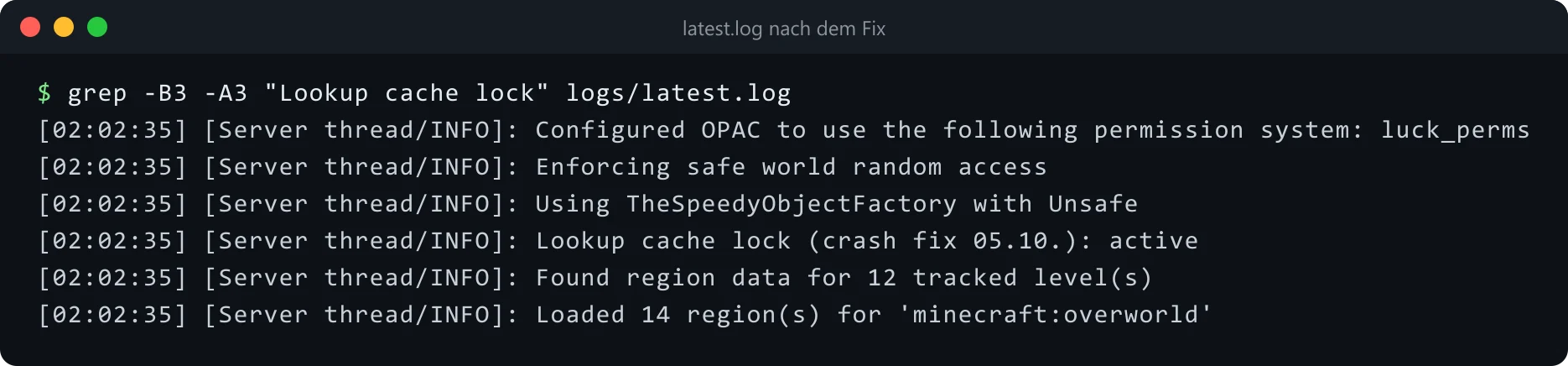
With this code, and with the mod from the repo, the log shows Lookup cache lock: active after startup. The mod from the repo writes Lookup cache lock: disabled in config if you’ve set lookupCacheLock to false. The screenshot below shows the line from CobbleBox. There it reads Lookup cache lock (crash fix 05.10.): active, because the server mod adds the date to the text. What matters in both cases is the active at the end. If it says NOT active, the mixin wasn’t applied, for example because the Fabric API renamed the methods.
After that, watch the log for Error upgrading chunk and for new watchdog messages. On CobbleBox the fix went live at 23:02 the same evening, as version 1.3.1 of the server mod. No more errors came overnight, and the adventure world reopened on October 6. Since then, checking that log line after every restart is part of the checklist.
What went wrong: no other classes in the mixin package
The first build of the fix, version 1.3.0, blocked the server startup for about 6 minutes. The reason was a structural mistake in the project: the mixin package (the code folder for mixins) contained a class that wasn’t a mixin itself. Mixin treats everything in the package named under "package" in the mixin config as a mixin class, and it won’t let those classes load normally. If the rest of your code touches such a class, for example an interface for an instanceof check, things break.
So only mixins belong in the mixin package. Put helper classes, marker interfaces and logic in another package, for example de.example.servermod instead of de.example.servermod.mixin. In version 1.3.1, LookupLocked moved one level up, and the server started normally again. Still, test a new mixin build on a test server first if you can, before you put it on the live server.
Wrapping up
The guide Regenerate a Minecraft world automatically explains how the weekly adventure world works, where the crash first showed up. You’ll find the complete code for the mod and mixin in the repo mapplebox/minecraft-weekly-world on GitHub, with the mixin at mod/src/main/java/de/mapplebox/weeklyworld/mixin/ServerWorldLookupLockMixin.java.
With a watchdog crash, first find what the server thread is waiting for, then the thread that was supposed to do that work. If you see a c2me-worker there with fabric_invalidateCache and "this.wrapped" is null, you most likely have the same race condition, and a mixin with one lock per world is enough to fix it. The guide How to set up a Cobblemon server shows how to set up a Cobblemon server with COBBLEVERSE and Pelican (a web panel for game servers) in the first place. If you want to see it all running, drop by CobbleBox at 2mc.mapplebox.de (the community speaks German, but everyone is welcome).
Did this guide help you? You can buy me a coffee on Ko-fi. It keeps MappleBox ad-free.